
Scheduling a thesis or dissertation defense means finding one time that suits a whole committee, and its members rarely share a calendar. Often one of them is an external examiner in another country. Whether you're the candidate or the coordinator arranging it for them, the job is the same.
This guide walks through it step by step, from checking your regulations to confirming the date.
Before you send anything
Check your program's regulations for four things. They decide who you ask and which dates you can offer.
- Who sets the date. Some universities only allow it once examiners are formally appointed, or have a central office that assigns it.
- Who must attend. Find out who is required, and whether a quorum or a substitute is allowed.
- Whether anyone can attend remotely. This often needs approval in advance.
- How much notice is required. Look for reading time, forms and any public announcement, then work back from your graduation deadline.
How far in advance to start
Start at least four weeks before the earliest date you could hold the defense. Examiners' diaries fill up, and your program's notice period comes on top of the time it takes to agree a date. Start earlier if your committee is large or includes someone who travels a lot.
Who to include in the poll
Ask only the people who must be there, usually the candidate, the supervisor and the examiners or committee. Leave out the audience and anyone whose attendance is optional, and tell them the date once it's set.
Every extra person makes a shared date harder to find. You usually can't change the size of a committee, but you can plan for it. If yours is large, start earlier, and settle before you send the poll whether one of them could attend remotely.
How many dates to offer your committee
Offer 5 to 10 options. A short list is quicker for a busy examiner to answer, and you can add more later if none of them work.
Spread your options across different days rather than listing every hour of a few days. Only offer times when you can get a room, and make each option long enough for the whole event, including deliberation.
How to set up the poll
Any scheduling poll will do. These steps use Rallly, which is free and doesn't ask your committee to create accounts.
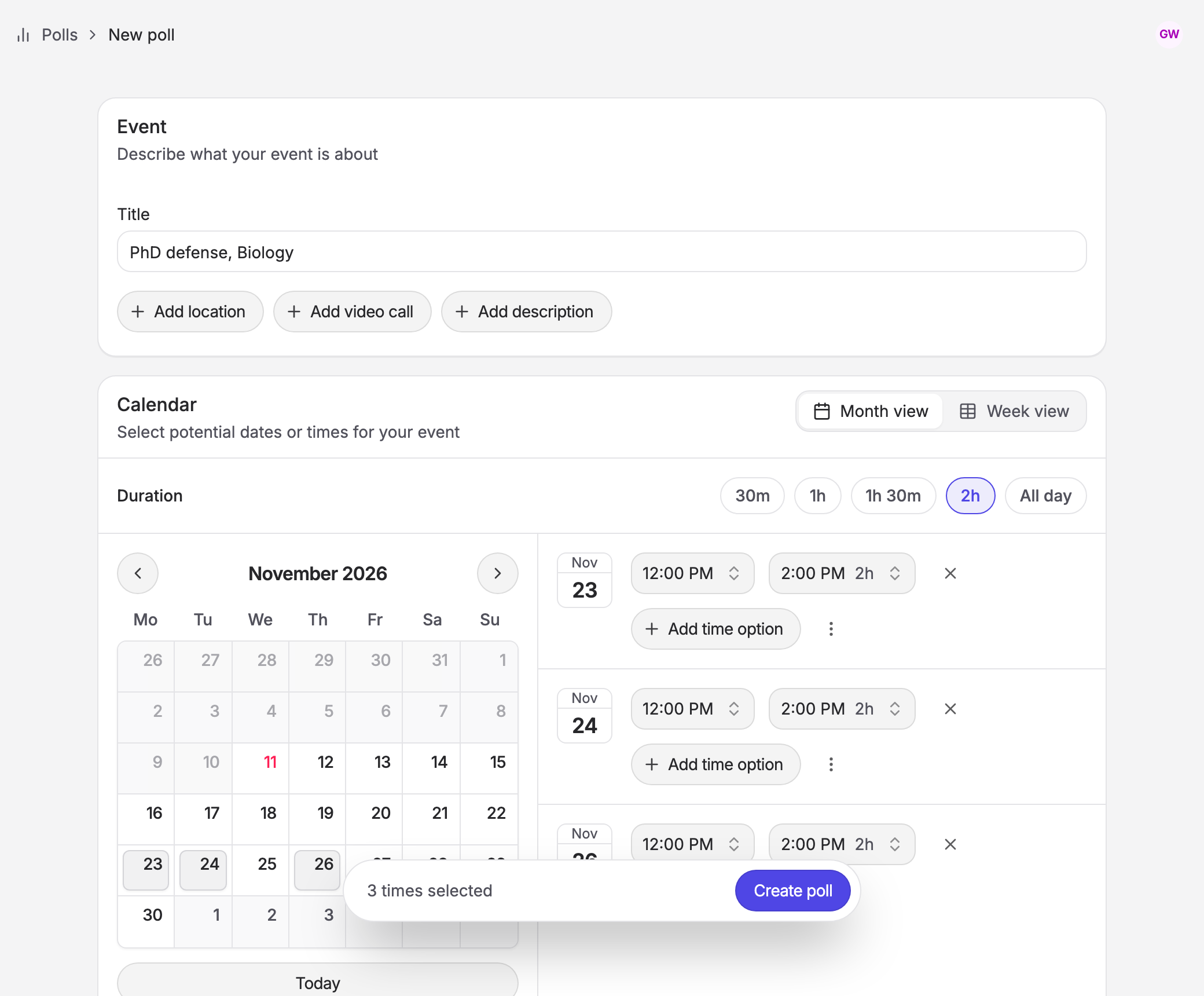
- Sign in to Rallly and go to Create a poll. A free account is enough, and you'll need one to finalize the date.
- Add a title such as "PhD defense, Biology, April". Anyone with the link can see the title and description, so leave out embargoed thesis titles.
- Click Add location, or click Add video call to have Rallly create a Google Meet, Zoom, Microsoft Teams or Webex link when you finalize. You'll need to connect that service under Settings first.
- Click Add description and say how long the event lasts and the date to respond by. Rallly doesn't enforce this date, so it's up to you to follow up.
- Set the Duration and select your options in the calendar.
- Leave Require email on, so that everyone can receive the calendar invite, and keep Vote options on yes, if need be and no.
- Click Create poll.
If you have an external examiner
An external examiner is often the hardest person to schedule. They don't appear in your university's calendar, and they may be several time zones away.
Rallly shows each person the options in their own time zone, so nobody has to convert anything. Include a few options that fall inside the external examiner's working day, and be careful around the weeks when clocks change, since countries change on different dates. They can respond from the link without an account.
Share it and follow up
Click Share, copy the invite link and send it to your committee. Ask people to choose "if need be" for any time they could make by moving something, since those answers often turn a near miss into a date. People can also leave a note that only you can see, which suits things like access needs.
As answers come in, the poll shows who can make each option.
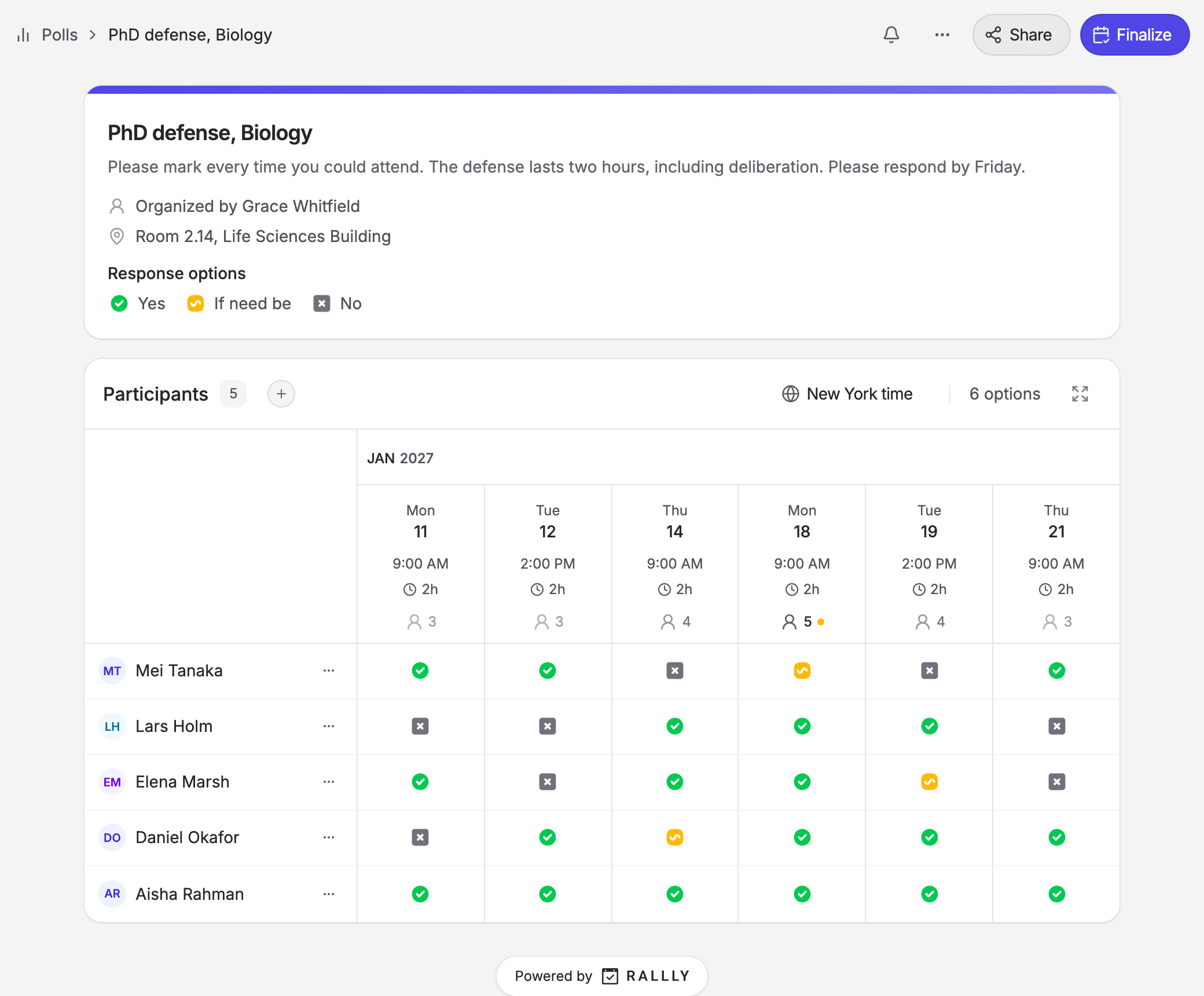
Give people a week to respond, and contact anyone who hasn't answered after three days.
Finalize the date
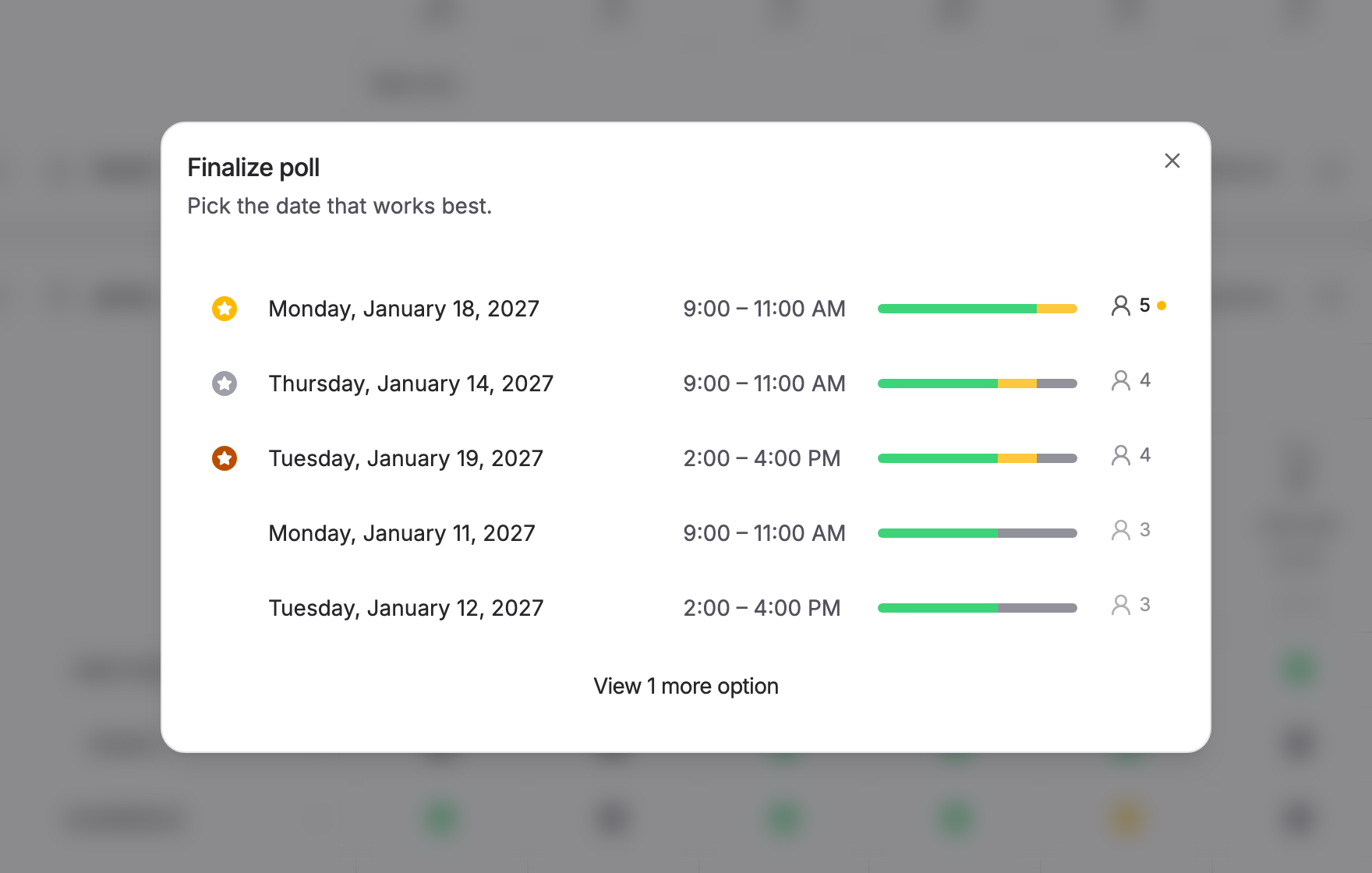
Click Finalize and Rallly lists your options with the best supported first. Choose the date and select who to notify. Everyone you select gets an email with a calendar invite, including the video call link if you added one. Book the room the same day.
What to do if no date works for everyone
Don't start again. Look at the options that came closest. If one of them is a single person short, ask that person whether they can move something.
If that doesn't work, check whether your regulations allow them to attend remotely or allow a substitute. As a last resort, edit the poll to add options in a period you haven't tried yet, then ask everyone to come back and answer them. Responses to your existing options are kept.
An example
Here is how this might look for an imaginary committee of five, with a supervisor, two internal examiners, a chair and an external examiner eight hours ahead.
The coordinator checks the regulations in early April. Everyone must attend, the external examiner may join by video, and the defense has to happen before mid June. On April 20 she creates a poll with eight two hour options spread over two weeks in late May, with half of them in the morning so that they fall inside the external examiner's day. She asks for answers by April 27.
Four people respond within three days, and she emails the fifth. No option gets five yes answers, but one has four and an "if need be" from an internal examiner. She confirms with that examiner, finalizes the date and books the room.
Frequently asked questions
How far in advance should you schedule a thesis defense?
Send your poll at least four weeks before the earliest possible date, and earlier for a large committee. Your program's notice periods may require more.
How many dates should you offer?
Between 5 and 10, spread across different days. You can add more later if none of them work.
What if a committee member doesn't respond?
Contact them directly after three days. If you use email invites, which are part of Rallly Pro, you can see who has opened the poll and who has responded.
Do committee members need a Rallly account?
No. They open the link, enter their name and email, and choose the times that work.
Can a coordinator schedule a defense for a student?
Yes. Create the poll yourself and include the candidate as one of the people responding. The answers come back to you, and you set the final date.
Is Rallly free for this?
Yes. Creating polls, collecting answers and finalizing are free. A free account can have three polls open at a time, and Rallly Pro removes that limit.


