
Spaces let a team share one Rallly subscription. Until now, they worked one way: every member could see and manage everyone else's polls and events. That works well for a small team that schedules together, but I kept hearing from larger teams that it gets in the way. They want to give everyone access without people stepping on each other's toes.
So spaces now have a team collaboration setting.
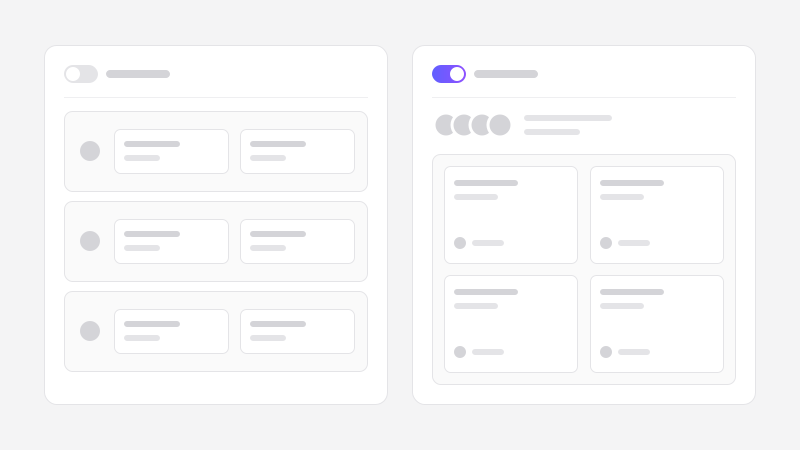
With team collaboration on, your space is a shared workspace. Everyone in it can see and manage everything created there, which is ideal when a team runs its scheduling together and needs to cover for each other.
With team collaboration off, members work independently. Everyone is still in the same space, sharing the subscription, the seats and the billing, but each person only sees and manages what they create themselves. That applies to everyone, including admins and the space owner.
New spaces start with collaboration off. Spaces that already had multiple members keep working as they always have, with collaboration on, and their owners can switch it off at any time in Settings → General.
What this makes possible
The setting splits spaces into two shapes:
A small team that schedules together keeps collaboration on. An assistant can manage a poll their colleague created, and nobody has to forward links around.
An organization that wants to roll Rallly out to a larger group turns collaboration off. Everyone gets Pro features under one subscription, each person's scheduling stays their own, and adding a new member doesn't expose anyone's existing polls.
Either way, this only affects what members of your space can see. Invite links and participant pages work exactly the same in both modes, so the people you schedule with will notice no difference.
You can read more about how it works in the collaboration docs.
What's next
This is a first step toward making Rallly work better for larger organizations. If you're thinking about rolling Rallly out to your team and something is missing for you, I'd like to hear about it. Email me at support@rallly.co.